
A custom WordPress theme should do more than shape your site’s appearance. Professional WordPress theme development uses WordPress functions, templates, and hooks to build dynamic content areas around your business needs, rather than limiting you to a pre-made theme.
You’re right to expect more than a visual redesign, since a theme also needs clear structure, reliable functionality, and a consistent experience across devices; dynamic sections let your team manage content in WordPress while templates shape how it appears.
This article explains how professionals choose between classic and block themes, structure pages and reusable templates, and use hooks and asset enqueuing to support a custom site built for your business.
Key Takeaways
- Choose a classic or block theme based on how your team needs to build and manage site content.
- Plan page templates and reusable sections around the content and layouts your website needs.
- Understand how WordPress selects templates so different pages and posts display in the right structure.
- Use hooks and properly enqueued assets to extend site behavior while keeping code organized.
How Does a Professional Develop a Custom Theme in WordPress?
A professional builds a theme around your content, brand, and site functionality, connecting custom layouts with WordPress data and editing tools.
Custom Versus Pre-Made Themes
A custom theme is built for your specific requirements, while a pre-made theme serves a broader range of sites. That difference matters when your pages, workflows, or brand need particular layouts. Professionals define the content structure first, then build templates and styling to suit it. WordPress theme development combines PHP, JavaScript, CSS, and WordPress functions to control how content appears in a browser.
Queries and Content Types
A post type defines a category of content, while taxonomies group and label its entries. For example, a business directory might use a “Location” post type and a “Service” taxonomy. Professionals connect these structures to the WordPress database, then create custom queries to display selected entries. This keeps content organized and supports tailored listings without forcing every item into standard posts or pages.
Customizer Settings and Theme Styling
Theme Customizer settings give editors controls for selected design options, such as colors or a logo. Professionals decide which options need controls and keep the rest consistent through theme styling and custom fonts. Responsive layouts adapt across screen sizes; semantic headings and descriptive page structures support search engine understanding. ETSI states Clause 9.1.4.4, “Resize text,” ensures users can adapt text size without assistive technology.
Development Tools and Coding Standards
Professionals use PHP, JavaScript, CSS, WordPress functions, and a local development environment to build and test themes. Look for experience in content architecture, responsive design, and WordPress coding standards. Developers sanitize input, validate data, and escape output to address common security risks. They enable WP_DEBUG during development, then test the editor and front end across browsers, devices, and varied content. Before submitting a theme to a directory, they package its files and prepare clear documentation for review.
Pages, page templates, and featured images
A WordPress page template controls how a page is displayed, while the page itself stores the content. Professionals map templates to your site’s needs, such as a service page, contact page, or landing page. This keeps editing straightforward: your team updates content in WordPress, and the template applies the intended layout and styles across the site.
PHP templates use the WordPress Loop to retrieve and display content. The Loop can render a title, body text, featured image, and metadata for each page or post. For example, a team page can show staff profiles, while a service template presents an introduction, benefits, and a clear next step. Custom post types can have their own display patterns without changing standard page content.
Featured images give each post or page a designated visual that templates can place consistently. A developer defines where the image appears and how the layout responds when no image is provided. Template tags then output WordPress data, such as a page title or image, without hardcoding each entry into the PHP file.
Reusable template parts separate shared areas, such as a header, footer, or call-to-action panel, from the main page structure. Shortcodes can insert specific content blocks into an editor, but they should suit the content rather than replace a well-planned template. WordPress hooks and filters can adjust output at defined points, while careful template selection keeps each page type aligned with the site’s structure.
For a custom WordPress website, this architecture makes content updates more predictable and reduces layout duplication. Development for WordPress can shape templates around your publishing needs, content types, and editing workflow.
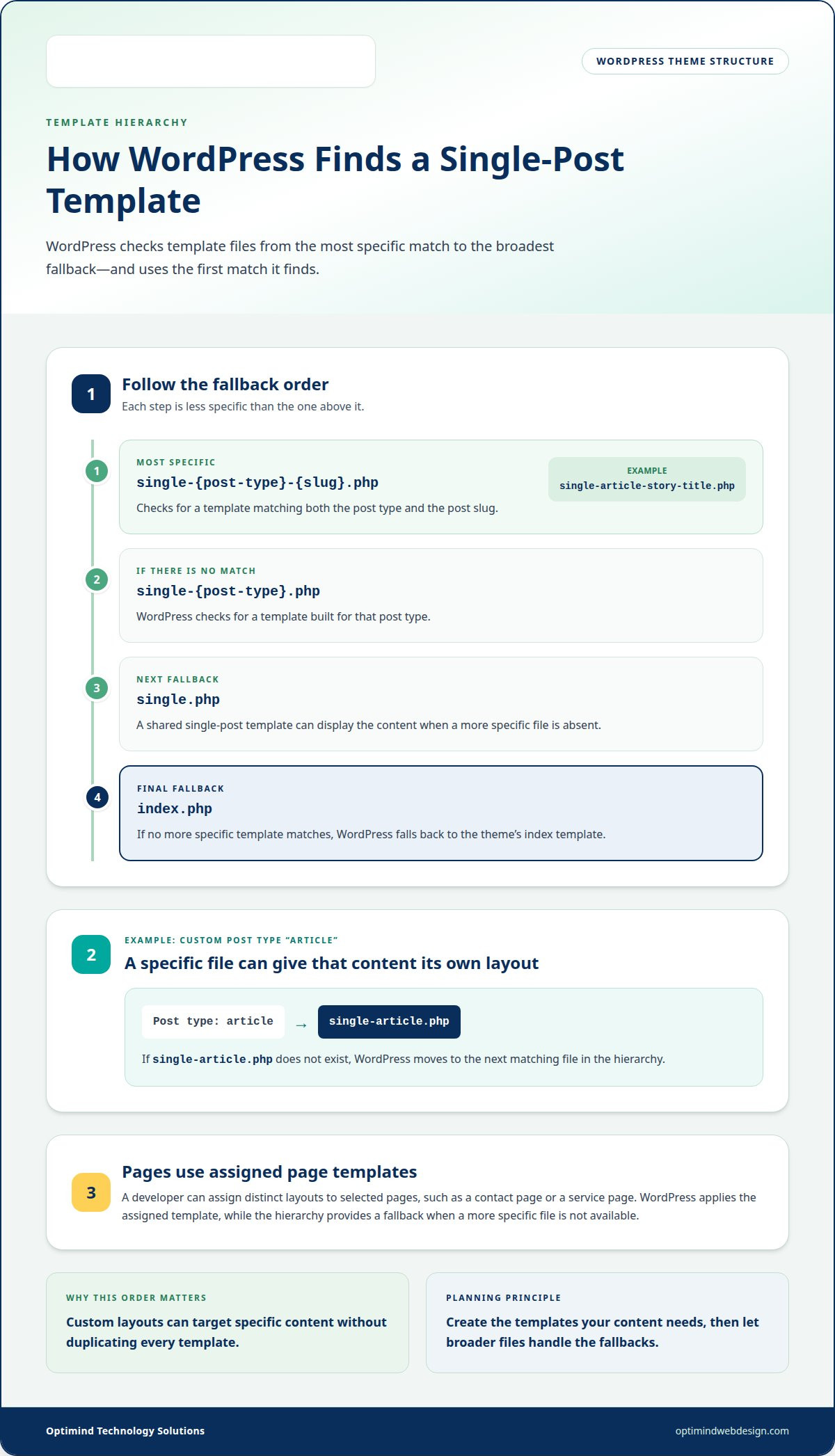
What Is the WordPress Template Hierarchy and How Does It Work?
The WordPress template hierarchy is the selection order WordPress follows to find a template file. It gives each page and post a predictable display structure.
How the Template Hierarchy Works
For a single post, WordPress checks increasingly general template files until it finds a match. The sequence is single-{post-type}-{slug}.php, single-{post-type}.php, single.php, then index.php. A custom post can therefore have its own layout, while other posts use a shared design. This order lets a custom WordPress theme handle specific content without duplicating every template.
For example, a post with the “article” post type can use single-article.php. If that file doesn’t exist, WordPress moves to the next matching file. Creating only the templates your content needs keeps the theme structure clear and the display rules easier to maintain.
Theme Files in the Hierarchy
Template files are PHP files that define how WordPress content appears on screen. The hierarchy directs WordPress to the most specific matching file, with index.php as the fallback when no more specific template exists. A theme’s style.css identifies its theme information, while template files control page structure and presentation.
Shared elements, such as a header, footer, or navigation area, can be separated into reusable parts. This lets one update keep those elements consistent across templates. Plugins can add features, but a theme’s template files determine how its own content layouts are assembled.
Page Templates and Template Selection
Page templates let a developer assign a distinct layout to selected WordPress pages. A company might use one template for its contact page and another for a service page. WordPress applies the assigned template to that page, while the hierarchy provides a fallback when a more specific file isn’t available.
Professionals map each page type to the right template before creating files. That plan keeps a landing page’s focused structure separate from a standard content page without disrupting shared navigation or styling. The result is a theme whose templates reflect your site’s content instead of forcing every page into one layout.
Action hooks, filter hooks, and asset enqueuing
Hooks extend WordPress at defined points, while asset enqueuing controls how theme styles and scripts load. Together, they add functionality without hardcoding every change into a template.
Action Hook Usage
An action hook lets a theme run code when WordPress reaches a specific event. For example, developers use wp_head or wp_footer to add approved output in the page header or footer. They can also attach a callback to wp_enqueue_scripts to register theme assets. This structure keeps additions separate from page display logic, making a blog post layout easier to maintain as settings change.
Filter Hook Usage
A filter hook changes data before WordPress displays or uses it. A developer might use the the_content filter to adjust a post before it appears, or modify an excerpt for a specific section. Filters return the updated value, so the callback must preserve the expected data type. This helps a theme adapt output without editing WordPress core files or rewriting the original content.
Enqueuing Theme Assets
Asset enqueuing registers stylesheets and JavaScript through WordPress functions instead of placing file links directly in templates. Developers commonly set this up in functions.php, using wp_enqueue_style and wp_enqueue_script. They define dependencies so a script loads after the library it needs, then enqueue assets only where required. For example, a gallery script can load on a page that displays a gallery, rather than across every section of the site. This keeps theme files organized and gives WordPress control over asset handling.
If your theme needs coordinated hooks and asset loading, plan your WordPress development around its functionality and display requirements.
WordPress actions insert content at specific points, while filters modify existing content. Keeping that distinction clear helps determine whether a change should add new material or alter what is already there.
Optimind Technology Solutions: Development for WordPress
Optimind develops custom WordPress themes for businesses that need page layouts, content features, and editing workflows tailored to their operations. Its Development for WordPress service can bring together custom templates, dynamic content, hooks, and asset loading in one coordinated build. Consider this service when your current theme limits how your team presents services, manages content, or supports distinct page types.
For projects that extend beyond theme structure, Web Design and Development can align the site’s interface and functionality, while Custom Web Application Development supports specialized online workflows. UX Design helps shape clear journeys through important pages and actions. The right scope depends on your content model, required features, and the experience you want visitors to have.
Contact Optimind Technology Solutions to discuss your WordPress theme requirements.
Shape Your Next WordPress Build
Set the next stage around the business decisions your website needs to support. Before development begins, align your priorities, content ownership, and desired visitor actions. This gives the project a clear direction and helps your team assess design and functionality choices against real operating needs.
WordPress theme development can be part of a broader digital plan, especially when your site needs to connect brand presentation with specialized workflows. Optimind brings Web Design and Development, Custom Web Application Development, and UX Design capabilities to projects where those needs intersect. The result is a coordinated scope built around your business, not a collection of disconnected features.
Move forward with a clear brief and a defined direction. Plan your WordPress project with Optimind Technology Solutions, and take the next step toward a site designed to support your goals.
Frequently Asked Questions
How Do Professionals Create Dynamic Content Areas Using WordPress Functions?
Professionals define content fields and display rules around what visitors need to see. For a staff directory, for example, each profile could include a role, biography, and contact detail, with optional fields omitted when empty. A professional also plans how lists are sorted, whether they need pagination, and what visitors see when no entries match the selected criteria.
What Should a Professional Include in the Basic Structure of a WordPress Theme?
A well-planned theme separates templates, reusable parts, styling, and scripts into clear areas. A developer can set shared colors, typography, and layout values in theme.json, while keeping theme-specific functions in a separate, prefixed namespace. This organization gives future developers a readable starting point and helps editors work with consistent design settings across different parts of the site.
How Does a Professional Create a Custom WordPress Theme Step by Step?
The project runs more smoothly when you provide the materials that shape its design and content. Share brand assets, a list of required pages, representative copy, and any special publishing needs. Review proposed layouts before development begins, then assess a working version with realistic content. Your feedback on missing details or unclear calls to action helps refine the final experience.
How to choose between a custom WordPress theme and a pre-made theme?
Base your decision on your editing needs, content variety, and planned site changes. A pre-made theme may fit if its available controls meet your needs without ongoing workarounds. Consider a custom approach if staff need distinct content fields, your publishing process has specific requirements, or your site roadmap calls for layouts that standard theme settings cannot support.
What are the best WordPress theme development tools and frameworks?
Use PHP, JavaScript, CSS, WordPress functions, and a local development environment to build and test themes. Bootstrap 3.3.6 can be used for responsive navigation.