
A website launch stays on schedule when website development project requirements define the scope, business goals, target users, technical needs, task owners, dependencies, approval points, and launch tests before work begins. Clear decisions give designers, developers, and stakeholders a shared plan, while vague or late-changing requirements create avoidable delays.
A successful website development project starts with more than a feature list. It needs a practical brief that connects the website to business goals and makes progress measurable. This guide covers how to define requirements, plan budget and ROI, organize project phases, manage approvals and timelines, and test the site before launch.
Key Takeaways
- Define the website’s goals, users, scope, and technical needs in a clear project brief before work begins.
- Connect budget and ROI planning to measurable business goals, then map tasks, dependencies, owners, and approvals to a realistic timeline.
- Coordinate discovery, design, development, testing, launch, and maintenance so each phase is ready for the next.
- Test key user journeys across browsers and devices before launch, and resolve usability, performance, and functional issues.
Budget, return on investment, and project management
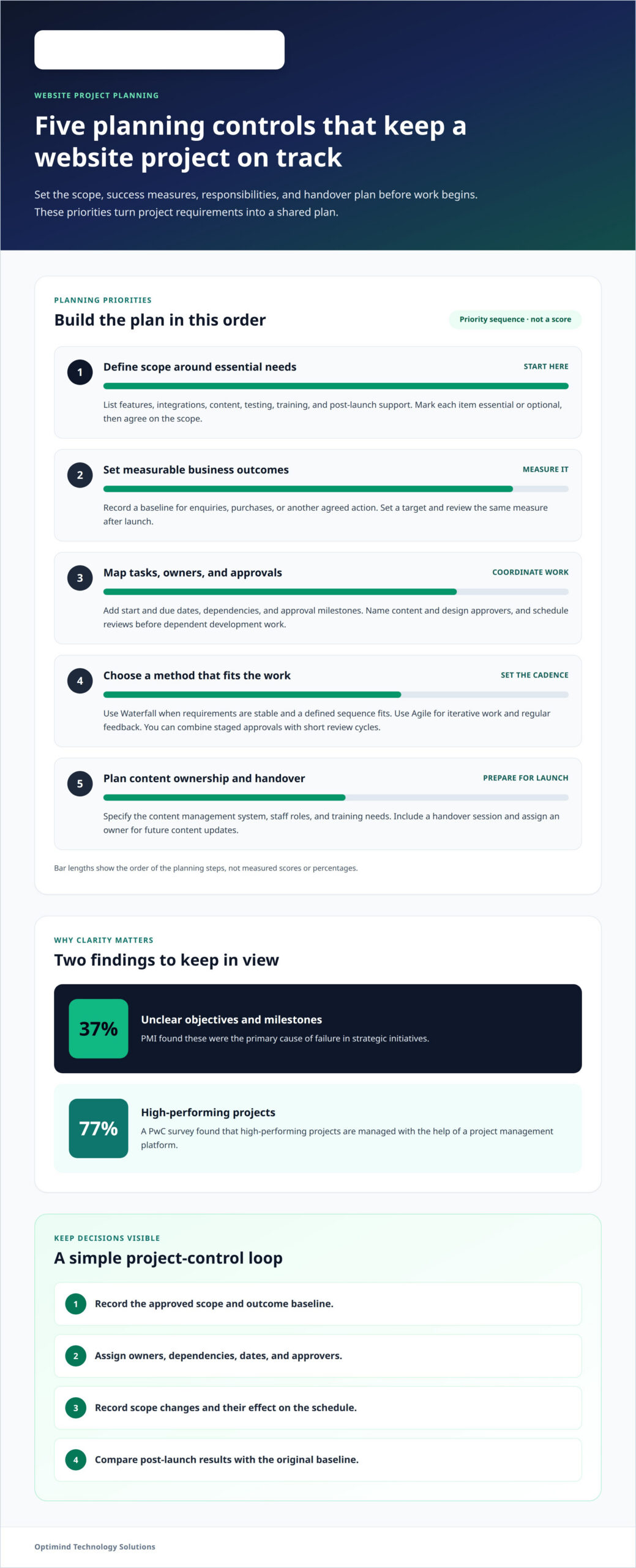
- Build the budget around scope, not an arbitrary page count. List essential features, integrations, content, testing, training, and post-launch support. An online store, for example, may need product management, payment processing, and order workflows. Mark each item as essential or optional, then allocate funds to the approved scope.
- Define return on investment (ROI) through measurable business outcomes. Record a baseline for enquiries, purchases, or other agreed actions before development starts. Set a target and review the same measure after launch. A redesign, for example, should connect visual changes to a clearer conversion path rather than treating appearance alone as success.
- Turn the scope into a schedule with task owners, start and due dates, dependencies, and approval milestones. PMI found that unclear objectives and progress milestones were the primary cause of failure in 37% of strategic initiatives. Name approvers for content and design, and schedule their reviews before dependent development work begins.
- Choose a project method that suits how decisions are likely to change. Waterfall follows a defined sequence and works best when requirements are stable; Agile supports iterative work and regular feedback. A team can combine staged approvals for fixed deliverables with short review cycles for evolving features. Record scope changes and their effects on the schedule.
- Plan for the people who will manage content after launch. Specify the content management system (CMS), staff roles, and training needs in the project plan. Editors may need practice updating product pages, while administrators manage access and publishing workflows. Include a handover session and assign an owner for future updates.
Build risk management practices into the project plan. A survey by PwC found that 77% of high-performing projects are managed with the help of a project management platform.
What Are the Main Phases of Website Project Management?
Before development begins, prepare approved copy, brand guidelines, logos, images, and design assets. The steps below take the project from user evidence to responsive, brand-aligned design.
-
How a Professional Team Researches Users and Plans Co-Design
Identify who will use the site and what they need to accomplish. Share examples of common tasks, such as finding a service or submitting an enquiry. A professional team can use these scenarios to guide user research and co-design. Avoid relying only on internal assumptions: customer expectations may differ from staff expectations.
-
What Content and Brand Assets Your Website Development Team Needs
Gather approved page copy, logo files, brand colours, fonts, product images, and existing marketing materials. An e-commerce business, for example, can prepare product descriptions, category names, and photography for key pages. Include brand guidelines or examples of approved digital campaigns. Flag missing content early, since placeholder text can hide layout problems and delay design approval.
-
How a Professional Team Prototypes the User Experience
Review wireframes and clickable prototypes before visual design moves into development. Check whether users can find key information, understand labels, and complete actions such as booking or submitting a form. A prototype lets stakeholders assess page order and navigation before coding begins. Give specific feedback about confusing steps, not just personal preferences.
-
How a Professional Team Aligns Design and Messaging with Your Brand
Approve a visual direction that reflects your brand voice, audience, and business goals. The design and development workflows should carry approved colours, typography, imagery, and messaging into reusable page layouts. Then review responsive examples across phone, tablet, and desktop screens. Check that text remains readable, buttons remain usable, and essential actions stay visible at each size.
Testing and checking for bugs before launch
Include browser and device testing, launch approvals, post-launch monitoring, maintenance ownership, and support arrangements. These website development project requirements should name who handles each check and what evidence is needed to approve release.
- Test critical user journeys across browsers and devices. Complete key actions, such as submitting an enquiry, using site search, and finishing checkout. Confirm that forms send correctly, links open the intended pages, and payment processing works as expected. Record results in a testing checklist, then retest every failed item after it is fixed.
- Log bugs by impact and assign an owner to each fix. A broken checkout prevents purchases, while a minor spacing issue may not. Set acceptance criteria for essential functions and make unresolved launch blockers visible to approvers. For an online store, for example, require a successful test purchase before approving release.
- Plan launch tasks before release day. Assign responsibility for final content approval, deployment, analytics checks, and confirming that key pages load correctly. For a redesign, test redirects from old pages to their new destinations. Keep a rollback plan ready in case the release disrupts important visitor actions.
- Include post-launch monitoring and support responsibilities in the website development project requirements. Assign an owner to review reported bugs, site performance, and user feedback. Define how staff report issues, who triages them, and how urgent faults reach the development team. Schedule website maintenance for security, content updates, and future feature needs.
- Use launch data to plan future improvements. Compare enquiries, purchases, and other agreed actions with the project baseline. Combine the results with support reports and user feedback to prioritize changes. Repeated questions about delivery, for example, may indicate that product pages need clearer shipping information.
What Information Should You Provide in a Website Development Project Brief?
Define website development project requirements before design and development begin. Clear objectives, scope, user needs, and technical details give the team a shared basis for decisions.
- State the business goal and how success will be measured. Choose an outcome tied to a real business action, such as qualified enquiries or completed purchases. For example, set a goal to increase enquiries by 10%-20% over the 12-month period after launch. Record the current baseline so the result has context.
- Describe your target users and the tasks they need to complete. A retailer in the Philippines might prioritize browsing product categories, checking delivery details, and completing checkout. Identify the pages and actions that support each task. This helps the team plan navigation, content, and conversion path around customer needs.
- Define the scope by listing required pages, features, integrations, and exclusions. Separate functional requirements, such as account creation or a booking system, from non-functional requirements, such as performance, security, and accessibility. Specify that the website should meet WCAG Level AA accessibility standards, and document how essential features should work.
- Document technical needs and existing systems. Name any required connection to inventory, customer records, analytics, or payment processing. Record the preferred content management system if you have one, plus user roles and publishing needs. Specify a technology stack expected to remain relevant for a minimum of 5 years.
- Set approval rules and define what counts as complete. Name the decision-makers for requirements, content, and design, then explain how requested changes are reviewed. Include acceptance criteria for key features, such as successful enquiry submission. A clear approval process helps resolve conflicting feedback before it affects delivery.
Optimind Technology Solutions
Optimind Technology Solutions turns website briefs into practical project plans and finished digital experiences. For requirements involving business goals, complex workflows, e-commerce, or a new website, Optimind aligns design and development decisions with the work your business needs the site to do.
Start with a brief that separates confirmed needs from open decisions. Identify your audience, essential user actions, existing systems, and the people who approve the work. If teams disagree about priorities, record the decision and its business rationale before detailed design begins. This gives project discussions a clear reference without locking future improvements into the initial release.
UX design shapes how people navigate a website and complete key tasks. Optimind’s Web Design and Development service turns the approved direction into a working site, while Custom Web Application Development can support specialized business workflows. For online stores, E-Commerce Development provides the structure and functionality needed for product discovery and purchase journeys.
Optimind’s design and development expertise connects business needs with practical decisions about user experience, functionality, and implementation. Your team brings the business context and priorities; Optimind uses them to guide the work. Clear decisions about essential features and future additions help stakeholders stay aligned throughout the project.
Optimind Technology Solutions can help turn your project brief into a website shaped around your business priorities. Start by discussing your goals, key workflows, and the decisions needed to define the project scope. A shared understanding of what the website must accomplish gives the work a clear foundation.
Contact Optimind Technology Solutions to discuss your website project requirements and next steps.
Frequently Asked Questions
What is a website development plan?
A website development plan coordinates the work, decisions, and approvals needed to take a site from discovery through maintenance. It connects the intended user experience with design, technical implementation, content, testing, and launch. For example, a project manager can use it to show when a product catalogue must be approved before developers connect it to an online store.
Is a website redesign planned differently than a new build?
Yes. A redesign must account for existing content, URLs, search visibility, and user behaviour, while a new build does not involve the same migration work. Plan a content audit, redirects from old URLs, and migration quality assurance before release. Preserve useful product pages, for example, and test that their new destinations work after launch.
What are potential project risks?
Common risks include late approvals, unclear feature boundaries, missing content, and delayed integrations. Each can block dependent work. A payment workflow, for example, cannot be tested properly until its requirements and integration details are settled. Record each risk with an owner, its likely impact, and a response, such as approving a fallback workflow before development reaches a blocked task.
What are the key project deliverables?
Deliverables are the agreed outputs used to review progress and accept completed work. They may include user research findings, an approved sitemap, wireframes, visual designs, working website features, test results, and handover materials. For an online store, a deliverable could be a tested product-purchase journey. Tie each item to an approval point so stakeholders know what they are reviewing.
What are the steps and typical timeline for a website development project?
A project generally moves through discovery, planning, design, development, testing, launch, and maintenance. The timeline depends on scope, integrations, content readiness, feedback, and approval speed, so estimate each stage against actual dependencies. Developers can begin approved page templates while final copy is being prepared, for example, but launch still depends on completed content and quality checks.
What hosting, domain, SSL, backup, and security requirements should a website have?
Define who manages the domain, hosting environment, SSL certificate, backups, access controls, and security updates. These responsibilities affect continuity and recovery if a technical issue occurs. Specify, for example, who can access administrative accounts and how the team restores a backup. Document these arrangements in the project handover, including who is responsible for routine website maintenance.