
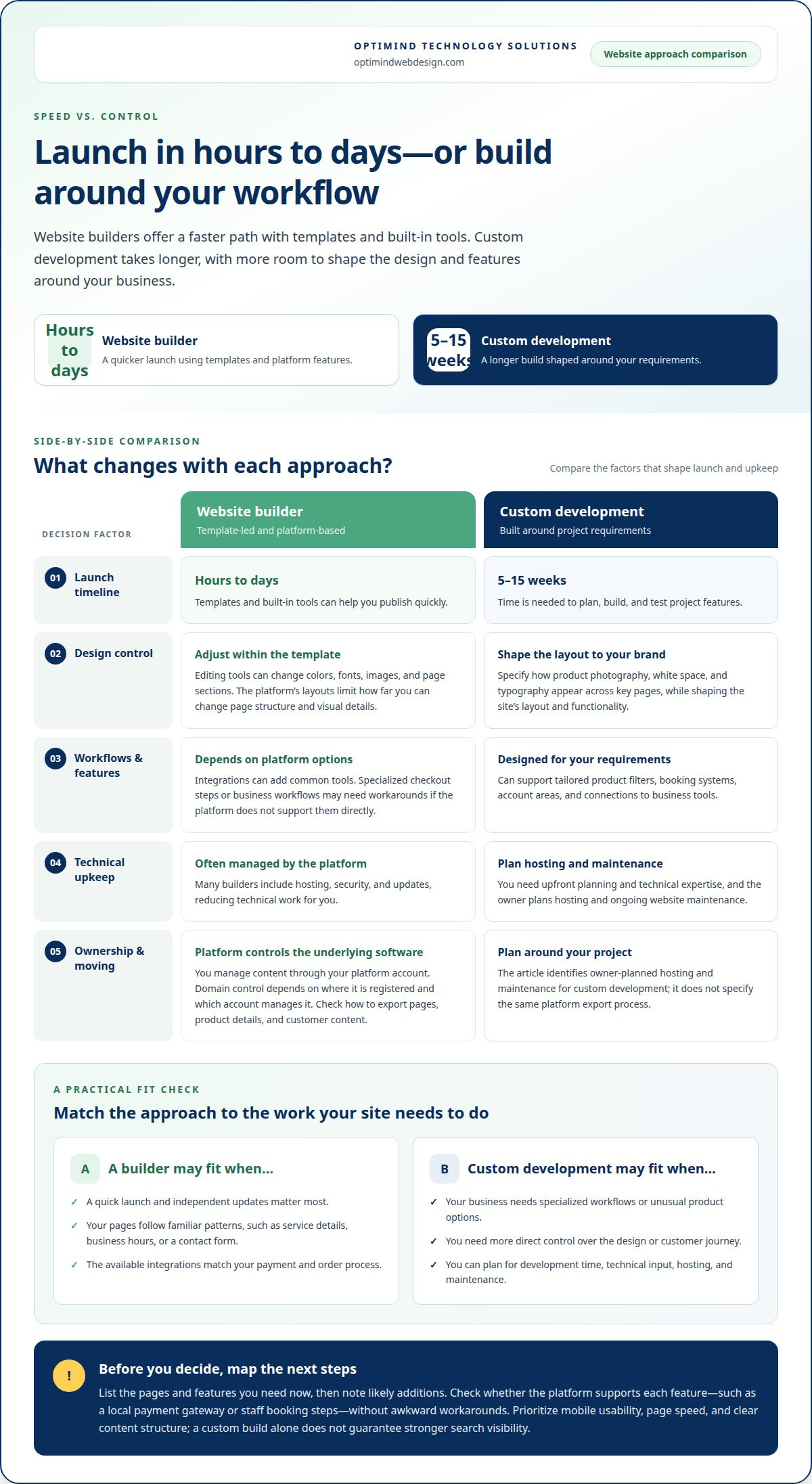
A website builder can get you live in hours to days, while a custom website may take 5-15 weeks to build; the right choice depends on how quickly you need to launch and how much control your business needs. In the custom website vs website builder decision, a builder offers a faster route through templates and built-in tools, while custom development gives you greater design flexibility and room for specialized workflows, with hosting, security, and website maintenance to plan for. This comparison explains the trade-offs in launch speed, design control, hosting, security, and maintenance, so you can choose an approach that fits your business needs now and can support what comes next.
Key Takeaways
- Choose a website builder when a quick launch and independent updates matter most; custom development suits specialized workflows and requirements.
- Decide how much control you need over page layouts, brand details, and the visitor journey before choosing a design approach.
- Consider your launch timeline and project complexity when choosing an approach.
- Prioritize mobile usability, page speed, and clear content structure; a custom build alone does not guarantee stronger search visibility.
Website Builder vs Custom Development: Which Gets You Live?
A website builder can launch in hours to days; custom development may take 5-15 weeks. The key difference is how much the site can be shaped around your workflows and future functionality.
Custom Development Features and Requirements
A custom website is built around your required pages, features, and business processes, rather than a standard template. Developers can use HTML, CSS, and JavaScript to create functions such as booking systems, tailored product filters, or connections to business tools. This approach suits workflows that ready-made integrations cannot support, but it calls for upfront planning, technical expertise, and time to build and test each feature.
Website Builder Features and Limitations
Website builders let you create a site without coding or design experience, using templates, SEO tools, and third-party integrations. Many include hosting, security, and updates, reducing technical work for you. A small business can use a template to publish service pages and an online store quickly, making setup straightforward. The trade-off is that layouts and features depend on the builder’s available options; specialized checkout steps or business workflows may need workarounds.
Website Builder Ownership
With a website builder, you manage the content through your platform account, while the platform controls its underlying software and code. Domain control depends on where the domain is registered and which account manages it. Before publishing, review the platform’s terms and find out how to export your pages, product details, and customer content. These details affect how easily you can move your site if your needs change.
| Option | Launch | Custom workflows | Technical upkeep |
|---|---|---|---|
| Website builder | Hours to days | Template and integration dependent | Often managed by platform |
| Custom development | 5-15 weeks | Designed for project requirements | Owner plans hosting and maintenance |
As your business adds products, a local payment gateway, or staff booking steps, assess whether the platform supports each feature without awkward workarounds. Choose a builder for a quick launch and straightforward updates; consider custom development when specific workflows need more direct control.
Design flexibility
Website builders adapt premade templates, while custom development can shape the layout and functionality around your brand. Compare the options against your visual identity, planned features, and expected changes.
Brand Identity and Design Flexibility
A builder lets you adjust template colors, fonts, images, and page sections with its editing tools. That can work for a straightforward service site, such as a consultancy with a home page, service details, and a contact form. However, the platform’s layouts limit how far you can change page structure and visual details.
Custom design starts with your requirements, not a template. You can specify how product photography, white space, typography, and calls to action should appear across key pages. For example, a Philippine retailer can create distinct product pages and campaign landing pages while maintaining a consistent brand identity. Templates speed up assembly; custom design allows more precise visual decisions.
Custom Functionality and Scalability
Design flexibility also affects how the site works. A builder’s integrations can add common tools, but advanced requirements may depend on the platform’s features. A custom build can align a product finder, booking system, or account area with your customer journey, rather than forcing each step into a standard template.
Plan for the next stage, too. A basic catalogue may later need filters, additional product information, or connections to internal processes. Custom development can account for these requirements in the initial structure, while a builder may require add-ons or workarounds. Those choices affect how easily your team can expand the site without disrupting existing pages.
To compare options, list the design elements and functions your business needs now, then identify likely additions. Choose templates for familiar layouts and available integrations; choose custom coding when your brand or workflow needs more control. A brand-led website design approach can help connect those choices to the customer experience.
Is a website builder a good choice for my business?
For many Philippine small businesses, a builder is a practical choice for launching a simple site quickly. The trade-off is less flexibility. Custom development often calls for more planning and technical input.
Builders suit straightforward goals, such as publishing business hours, service details, and a contact form. Custom websites can support tailored workflows, but require more planning and website maintenance. Choose based on what the site needs to do and how you’ll manage it.
Choosing Between a Builder and Custom Development
A website builder makes setup accessible through templates and platform features, so you can publish pages without coding. That can leave more of a small business’s resources for product photography, inventory, or customer service. Custom development provides greater control over functionality, but requires planning and development work before launch.
For example, a neighborhood salon can start with service pages and appointment details. An ecommerce business with unusual product options may need custom workflows. Compare the work each option can support, along with its ongoing platform or website maintenance needs.
When to Choose a Website Builder
Choose a builder when your immediate goal is a basic online presence, your pages follow familiar patterns, and a quick launch matters. A freelancer can publish a portfolio; a small shop can list products using the platform’s ecommerce tools. This approach works best when the available integrations match your payment and order process.
Before committing, list the pages and functions your business needs now, then separate essential features from future plans. Check whether the platform supports each essential step, from product selection to payment processing. If a workaround would complicate customer orders, custom development may be a better fit.
Use this decision guide:
- Choose a builder for standard pages, simple ecommerce, and independent updates.
- Consider custom development for specialized processes, tailored customer journeys, or features the platform cannot support.
- Plan ongoing needs by accounting for platform features or website maintenance alongside the initial build.
A builder can make it easier to launch the first version, but future changes may encounter platform limits or require workarounds. Custom development can address complex requirements directly. Choose the approach that supports your current goal without making essential next steps harder.
Which option is better for SEO, speed, and performance?
Neither option guarantees stronger search visibility: a custom-built website does not automatically rank better. A website builder may provide SEO tools, while custom development can offer more control over page structure and technical choices.
With either option, create clear page titles, descriptive headings, and useful content for each service or product. For example, a Philippine furniture shop can give dining tables and office desks separate pages instead of placing every item on one long page. Clear navigation helps visitors and search engines understand how the pages relate.
Page speed depends on implementation, not the type of build. Large product images, unnecessary scripts, and heavy page elements can slow down either a builder site or a custom site. Compress product photos, remove unused features, and test key pages on mobile devices. For an ecommerce store, prioritize the home page, product listings, and checkout, since they shape the buying journey.
A builder can simplify technical work with platform-managed hosting and built-in settings, though the available controls vary. Custom development can be structured around specific performance needs, but hosting, security, and ongoing maintenance still need planning. Compare actual pages, not promises: test a product page and checkout flow, then check whether images load quickly and buttons respond smoothly on a phone.
Use this decision rule: choose a builder if its SEO settings and performance controls support your planned pages. Consider custom development if technical constraints block the structure or functionality your business needs. Neither approach replaces useful content, clear navigation, and regular maintenance. For a site planned around search visibility and user experience, discuss your website requirements.
Optimind Technology Solutions: Custom Web Application Development
Optimind Technology Solutions develops custom web applications for businesses with workflows that need more than standard website features. Turn to this service when customers or staff need a specific process, such as submitting structured requests, managing account information, or completing a tailored booking flow.
For a public-facing site, Web Design and Development and UX Design can create clear page layouts and user journeys. E-Commerce Development helps businesses build online shopping experiences. The right approach depends on the functionality your business needs and how people will use it. Outline your main tasks, users, and required features to guide the project discussion.
Contact Optimind Technology Solutions to discuss your website or application requirements.
Set Your Website Up for What Comes Next
Your choice should support the next stage of your business, not just the launch. Before committing, map the tasks customers need to complete, the content your team will manage, and the changes you expect to make. This practical brief turns the custom website vs website builder comparison into a decision about fit, ownership, and room to grow.
When your requirements call for a tailored user journey or features beyond standard templates, Optimind Technology Solutions combines Web Design and Development, Custom Web Application Development, and UX Design. Its team can shape the site around your business processes and the people who use it, planning functionality alongside the user experience.
Share your goals and key requirements to start a focused discussion about the right approach. Contact Optimind Technology Solutions and take the next step toward a website built for your business.
Frequently Asked Questions
What is the difference between a custom website and a website builder?
A website builder provides an editing interface within a platform; a custom website is developed to meet a project’s technical and business requirements. This affects routine changes: your staff may edit text or images through a builder, while changes to custom features may involve development work. Compare the day-to-day tasks your team expects to handle, not just the finished site’s appearance.
How long does it take to build a custom website versus using a website builder?
A builder can be published once its content, product details, and settings are ready; a custom project also needs time for development and review. The schedule may shift if product data arrives late, stakeholders revise approved layouts, or a third-party integration needs configuration. To keep work moving, assign decision-makers and prepare brand assets, product information, and required account access early.
How customizable and scalable are website builders compared with custom-built websites?
Scalability means more than adding pages. Consider whether your site can handle a larger catalogue, more detailed product records, additional staff roles, and new customer journeys without making daily management harder. A custom build can be structured around those needs, while a builder’s growth potential depends on its platform features. Document expected changes and consider their impact on content management and operations.
What are the security, maintenance, and backup responsibilities for each option?
Set an operating routine for either approach: assign someone to manage access, decide who reviews updates, and record how backups are created and restored. Limit accounts to people who need them, and remove access when responsibilities change. A backup plan is useful only if your team knows how to restore the site and its important records after a problem.
How do you choose between a custom website and a website builder for an online store in the Philippines?
Map the store’s daily operations before choosing: who updates stock, how orders reach the fulfillment team, and how customers receive delivery updates. For a local retailer, also map shipping coverage, returns, and customer support. A platform that fits the buying experience but disrupts order handling may create avoidable work. Choose a setup that supports both the customer journey and your team’s fulfillment process.
What steps are involved in building a custom website or launching one with a website builder?
Start with an approved project brief that identifies the audience, required outcomes, decision-makers, and launch responsibilities. Then settle content ownership, access roles, and any existing page addresses that need to remain reachable. Before launch, test typical customer tasks, review mobile layouts, and confirm staff can complete routine updates. Assign a post-launch owner to track issues and coordinate changes as the business evolves.