
A business workflow web application can automate a single task or an entire business process, but automation works best when the business rules are clear. A well-designed application does more than pass work between people: it validates inputs, applies decisions, and routes each task to its next step.
Workflow apps can help teams coordinate approvals, requests, and projects. The key is making those processes reliable when data is incomplete or needs to be reformatted. This article explains how rules shape workflow logic, how validation and transformation keep information usable, and how diagrams clarify responsibilities and progress.
You’ll also learn how to compare workflow options by their ability to handle rules, support collaboration, and fit your process, so you can choose an approach that enables clearer decisions and smoother day-to-day work.
Key Takeaways
- Match the workflow tool to the process: decide which tasks to automate, which systems must connect, and whether low-code or custom logic fits your team.
- Set rules for validating, transforming, and routing data so errors and exceptions don’t disrupt the work that follows.
- Use workflow diagrams, boards, and progress indicators to make stages, responsibilities, and task status clear to collaborators.
- Design around business rules and human oversight, then compare options by how well they support your actual process and collaboration needs.
What are Business Workflow Apps?
A business workflow web application coordinates a process in a browser, from a submitted request to its recorded outcome. For example, an employee onboarding workflow can route an account request to a manager and then to IT. Workflow management makes ownership and progress visible as work moves forward.
API integrations connect a workflow with existing systems through defined data exchanges. For example, a sales request can send customer details to a business system and approval information to another tool. Integrations can link forms, project boards, and communication platforms, keeping relevant information connected throughout the process.
Low-code and no-code workflow tools let teams configure steps using visual editors, templates, and drag-and-drop actions. A no-code integration can send a form submission to a task board, while custom API logic can support more specific requirements. The right approach depends on whether the process follows standard steps or needs tailored behavior.
Useful features include task assignment, approval routing, data validation, status tracking, notifications, and a shared dashboard. For example, a leave request can move from submission to review while showing its current stage to relevant users.
For a Philippine business, the right option is the one that fits its process, existing systems, and team’s technical capacity. Compare integration-led platforms, visual workflow builders, and custom applications against those requirements.
For Philippine accounting, payment, and collaboration tools, integration depends on available connectors or APIs. Identify the systems involved and the information each needs to exchange.
Security risks include excessive access, exposed data, and failed integrations that leave records incomplete. Use role-based permissions, limit shared information, and define how errors are flagged and handled.
Business rules, data validation, and transformation
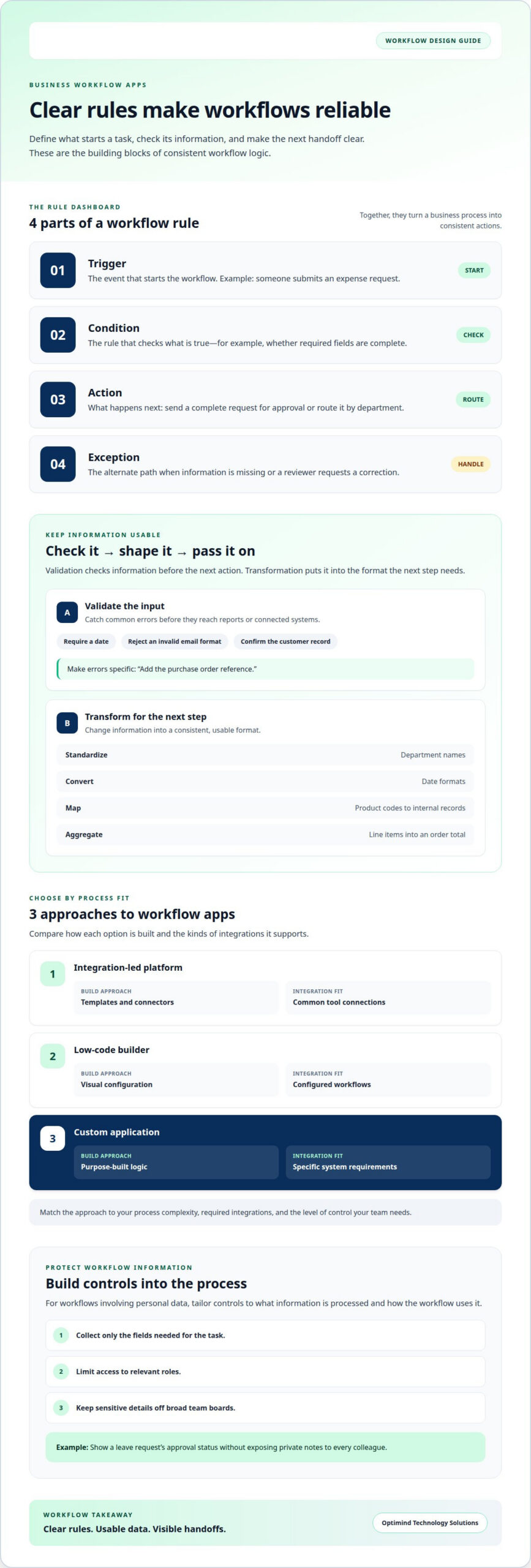
Rules turn a business process into consistent actions, rather than leaving every step to individual judgment. For a purchase request, a rule can send an approval to a manager. If the supplier field is blank, submission can pause until the requester completes it. This structure makes repetitive decisions predictable and gives task management a clear path.
Start by defining each trigger, condition, action, and exception. For example, submitting an expense request can trigger a check for required fields. A complete request moves to approval; an incomplete one returns for correction. Another rule can route requests by department or expense category. Clear conditions reduce manual sorting and make tracking easier because each request has a visible status.
Data validation checks whether information is complete and usable before the next action. A form can require a date, reject an invalid email format, or confirm that an order includes a customer record. These checks prevent common errors from spreading into reports or connected systems. Validation should explain what needs correcting, such as “Add the purchase order reference,” rather than display a generic error.
Transformation changes information into the format needed for the next step. An application might standardize a department name, convert a date format, or map a submitted product code to an internal record. Aggregation combines related records, such as line items into an order total. Together, validation and transformation protect data quality and support productivity across connected tasks.
For Philippine workflows involving personal data, privacy obligations depend on what information is processed and how the workflow uses it. Design controls around the process: collect only the fields needed for a task, limit access to relevant roles, and avoid displaying sensitive details on broad team boards. For example, a leave request can show its approval status without exposing private notes to every colleague.
When rules span multiple systems or exceptions, workflow rule design can map each condition, data check, and handoff into one coherent process.
Workflow diagrams and collaboration
A useful workflow diagram shows where work starts, which applications are involved, and where the result goes. Map the trigger first, such as a customer submitting an order form. Then show each action and destination, such as sending order details to a sales system and assigning follow-up to a team member. This makes handoffs visible before automation begins.
For a simple project, map the stages from input to output and mark each task’s current position. A content approval flow might move from draft to review, approval, and publication. Add the person responsible at each stage and the decision that moves work forward. If a reviewer requests edits, show the return path to the writer.
Kanban boards and approval pipelines turn a workflow map into a tool for daily collaboration. A support team can sort incoming cases by status, while managers review items awaiting approval. Each card or request should show an owner, the next action, and relevant details. This structure streamlines coordination without requiring a separate manual status update at every handoff.
Routing rules send each request to the right person or team. For example, a service request can go to the department responsible for its category. Notifications can alert an assignee when work arrives or tell a requester when an approval changes status. Clear routing reduces missed handoffs and gives collaborators a shared record of progress.
Use visual feedback to make status easy to understand at a glance. A progress bar can show how far a project has advanced, while an indicator can flag a blocked task. Use specific labels, such as “Waiting for review” or “Changes requested,” instead of relying on color alone. In a business workflow web application, accessible, consistent visuals help teams interpret the same process across devices.
Before building, trace a real request from its trigger to completion. Confirm the applications involved, each owner, the decision points, and the notifications needed. This diagram gives collaborators a concrete model to review, refine, and follow as workflow automation moves routine coordination out of scattered messages.
Designing workflows around business rules
Build the workflow around the business rule, not the screen. First, define the trigger, the decision required, and the person accountable for the next action. For a purchase request, a department rule can route the document to the appropriate approver. The application should record its status and preserve the reason for each decision.
Next, map the usual route and its exceptions. A complete request might move directly to review, while a request with missing information returns to its owner. An approval can proceed automatically when conditions are met, but decisions with significant effects on individuals need human oversight. This balance keeps automation efficient without removing judgment where it matters.
Employee onboarding shows how rules shape timing and access. A workflow can trigger account and app provisioning so a new hire has the required tools by their first day. Define which department owns each step, what information it needs, and who handles delays. A clear route prevents an incomplete handoff from stalling the entire process.
Plan how the workflow will respond to system failures before launch. If an API or application is unavailable, it can retry the action or notify relevant stakeholders by email. Missing data needs its own route, not a silent failure. Decide whether each process runs in near real time or in time-based batches according to how quickly the next decision is needed.
Finally, use status tracking and reporting to test whether the rules work as intended. A manager should be able to identify requests awaiting approval, stalled steps, and recurring data gaps. Review those patterns with the departments involved, then refine the conditions instead of adding manual workarounds. This makes workflows clearer for teams and easier to manage as processes change.
For a process with distinct rules, exceptions, and handoffs, plan a workflow application around your business rules.
Optimind Technology Solutions: Custom Web Application Development
Optimind develops custom web applications for businesses whose rules, approvals, and system connections do not fit a standard workflow tool. When a process spans departments, handles exceptions, or needs specific data checks, a purpose-built application can bring those steps together in a workflow designed around the business.
A tailored application can connect process logic with a clear interface, helping staff follow each request, understand its status, and complete the next action. UX design shapes screens around how your team works, while web design and development supports a wider digital experience. For online stores, e-commerce development can support workflows connected to selling and order handling.
If your workflow needs a tailored web application, contact Optimind Technology Solutions to discuss your requirements.
Turn workflow decisions into your next build step
Turn your analysis into a focused project brief. Identify the process outcome that matters most, the users affected, and the operational constraint that currently slows progress. Then rank proposed features by how directly they support that outcome. This gives your team a practical basis for deciding what belongs in the first release and what can come later.
Optimind can help translate those priorities into a clear web application plan. Its web development expertise supports the technical and usability decisions that shape a successful build, helping align project scope with how your business needs to operate.
Share your goals and discuss a practical next step. Contact Optimind Technology Solutions to start the conversation and move your project forward.
Frequently Asked Questions
What are the business rules/logic?
Business rules are the conditions and permissions an application applies to a decision. For example, an order cancellation rule might allow cancellation before fulfillment but require a review after dispatch. Logic can also calculate an outcome or send unusual cases for manual review. Writing conditions in plain language helps business owners and developers agree on expected results before implementation.
What business applications are involved?
The applications involved are the systems that create, store, or act on information in a process. A hiring process might involve an applicant tracking system, an HR information system, and identity management software. Decide which system owns each record, such as a candidate profile or employee account. This helps prevent conflicting records and clarifies where updates should be made.
What is a workflow application?
A workflow application supports repeatable work but does not replace the policy or judgment behind it. It can guide routine cases through agreed steps while sending unusual cases to a person for review. For example, a standard supplier request may follow an established path, while a request with incomplete documentation pauses for staff input. This keeps automation aligned with operational decisions.
What is a business workflow web application?
A business workflow web application is a browser-based application built to support a defined business process. Unlike a public-facing website, it can provide authorized users with task-specific screens and access to business records. For example, a regional sales team could use a shared internal portal to submit deal reviews, while each role sees only the functions relevant to its work.
How do business workflow platforms compare by features?
Integration-led platforms offer templates and pre-built connectors; low-code builders provide visual configuration, while custom applications support tailored logic and specific system requirements.
What are the best business workflow web applications for Philippine businesses?
The best option is the one that fits the business’s process, existing systems, and team’s technical capacity. Compare integration-led platforms, visual builders, and custom applications by required connectors or APIs, workflow complexity, and control over rules. Use role-based permissions and define how errors will be handled.